Discover which is better with Custom Website vs Website Builder
Anyone can launch a website today. Wix, Squarespace, Shopify, and GoDaddy Website Builder let you go from zero to “live” in an afternoon.
But here’s the question that actually matters:
Will that website help your business grow — or just sit there?
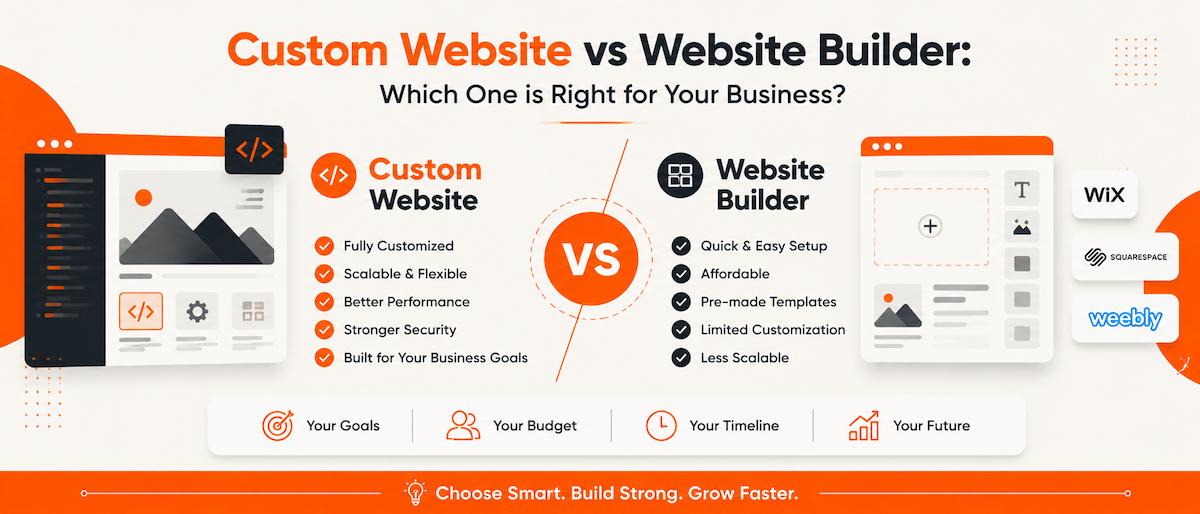
Choosing between a website builder and a custom website is one of the highest-leverage decisions a business owner makes early on. Builders win on convenience. Custom websites win on flexibility, performance, and long-term ROI. This guide breaks down exactly where each one holds up — and where it doesn’t — so you can decide with your eyes open.
What Is a Website Builder?
A website builder is a drag-and-drop platform that lets you assemble a site from pre-made templates — no coding required. That’s the whole pitch, and for a lot of businesses, it’s a fair one.
Popular options include:
- Wix
- Squarespace
- Shopify
- GoDaddy Website Builder
Where builders genuinely deliver:
- You can go live same-day
- No developer needed for basic changes
- Entry pricing is low ($10–30/month range for most platforms)
- Templates are pre-tested for mobile responsiveness
Where they start to strain:
- Templates cap how far your design can diverge from “everyone else on this platform”
- You’re renting, not owning — cancel the subscription and the site is gone
- Adding anything beyond the platform’s built-in feature set (custom booking flows, non-standard integrations, unique checkout logic) often isn’t possible at all
- SEO settings are accessible but shallow — you can edit a meta title, but you usually can’t touch server response times, structured data depth, or code-level page speed
For a portfolio, a pop-up event page, or a business that needs to validate an idea fast, this trade-off is worth it. For a business betting its growth on organic search traffic, it’s a real constraint.
What Is a Custom Website?
A custom website is built specifically around your business — your workflows, your brand, your customer’s actual path to purchase — rather than fitted into a template’s assumptions.
It can be built on WordPress (the most common route, since it balances flexibility with manageable cost) or built from scratch with modern frameworks for businesses with more complex functional needs.
The core difference isn’t aesthetics. It’s control: over code, over structure, over what the site is allowed to do as your business changes.
Custom Website vs Website Builder: A Quick Comparison
| Feature | Website Builder | Custom Website |
|---|---|---|
| Design | Template-based | Fully customized |
| Branding | Limited | Unique brand identity |
| SEO | Basic optimization | Advanced SEO capabilities |
| Performance | Average | Optimised for speed |
| Scalability | Limited | Easily expandable |
| Ownership | Platform dependent | Complete ownership |
| Flexibility | Limited | Highly flexible |
| Long-Term Growth | Moderate | Excellent |
While both options can help you establish an online presence, the right choice depends on your business goals.
Which Option Is Better for SEO?
This is where the gap is widest, and it’s worth being specific instead of just saying “custom is better.”
Website builders let you edit the obvious stuff — page titles, meta descriptions, maybe alt text. What they don’t give you control over:
- Server response time and caching rules
- Clean, semantic HTML output (builders often generate bloated markup)
- Fine-grained schema markup beyond whatever the platform auto-generates
- URL structure in edge cases (some builders still force awkward paths)
- Render-blocking scripts from the platform itself, which you can’t remove
Custom websites let a developer control all of the above, which matters because Google’s ranking systems weight technical performance (Core Web Vitals) alongside content relevance. A perfectly written page on a slow, bloated template can still lose to a competitor with average copy and a fast, clean site. For a deeper look at performance, see our Core Web Vitals guide.
The honest caveat: a poorly built custom site with no SEO strategy behind it will lose to a well-optimized Squarespace site every time. The platform doesn’t guarantee results — it just removes the ceiling.
Performance and Speed
Site speed affects three things at once: how long visitors stay, how likely they are to convert, and how Google ranks the page. Google’s own research has repeatedly tied slower load times to higher bounce rates, and it’s one of the more consistent findings in web UX studies.
Builders carry unavoidable overhead — shared infrastructure, platform-level scripts, and template code you can’t strip out even if you’re not using every feature it includes.
A custom-built site strips that away: only the code your site actually needs, images compressed for the use case, and hosting configured around your traffic patterns rather than a one-size-fits-all setup.
(If you want this section to actually carry weight for your readers, this is the spot to drop a real number — e.g., “we took a client’s homepage from a 4.2s to 1.1s load time by rebuilding on custom code” — pull an actual before/after from one of your projects.)
Design Flexibility
Templates are built to be recognizable — that’s how the platform keeps its costs down. Which means your site can end up looking like a cousin of ten other businesses in your space.
A custom build removes that ceiling entirely:
- Layouts built around how your customers actually browse and buy
- Custom animations and interactions, not just template toggles
- Integrations with the specific tools your business already runs on (CRM, booking software, inventory systems)
For businesses competing on trust and brand perception — agencies, local service businesses, consultancies — this isn’t a nice-to-have. It’s often the difference between “looks like a real business” and “looks like a template.”
Planning for What’s Next
Most businesses don’t stay the same size or shape for long. Common additions down the line:
- Online booking or scheduling
- Customer login portals
- Membership or subscription tiers
- E-commerce and payment processing
- Course or LMS functionality
- CRM integration
Builders handle some of this through paid add-ons, but you’re often stacking third-party plugins on top of a platform that wasn’t built for them — which is where performance and reliability start to degrade. A custom site is architected with room to add these features cleanly, because the codebase was designed to be extended rather than patched.
The Real Cost Comparison
Builders look cheaper because the sticker price is lower. But the honest comparison isn’t “cheaper vs. more expensive” — it’s total cost over time.
Builder costs that add up:
- Monthly platform subscription (indefinitely — you never stop paying)
- Premium template purchases
- Paid plugins/apps for functionality outside the core platform
- Storage and bandwidth upgrades as traffic grows
Custom website costs:
- Higher upfront investment for design and development
- Hosting (typically far cheaper than platform subscription fees)
- Occasional maintenance/updates, but no recurring platform tax
The better question isn’t “which is cheaper today” — it’s “which one costs less over 3 years, and which one do I actually own at the end of it.”
Who Should Choose a Website Builder?
A builder is the right call if you:
- Need a portfolio or personal site
- Are testing a business idea before committing
- Need something live today, not next month
- Have a genuinely limited budget
- Just need a simple informational page — hours, location, contact info
There’s no shame in this — it’s the right tool for these situations.
Who Should Invest in a Custom Website?
A custom build makes sense if you:
- Run a local business competing on trust and reputation
- Offer professional or consulting services
- Run an agency
- Operate e-commerce with specific functional needs
- Are serious about ranking on Google organically
- Expect to need features a template can’t support
- Plan to still be growing in 2-3 years
If the website’s job is to generate leads and build credibility — not just exist — the custom route usually pays for itself.
So, Which One Should You Choose?
There’s no universal answer. A builder gets you online fast with minimal technical overhead. A custom website costs more upfront but removes the ceiling on design, SEO, and functionality as your business grows.
The right call depends on where your business is today and where you expect it to be in two years — not just what’s cheapest this month.
Frequently Asked Questions
Is a custom website better than a website builder?
It depends on your requirements. A custom website offers greater flexibility, better scalability, and more control, while website builders are ideal for simpler projects.
Are website builders good for small businesses?
Yes, they can work well for businesses with basic needs. However, businesses planning to grow often benefit from the flexibility of a custom website.
Which option is better for SEO?
Both can be optimised, but custom websites generally provide more control over technical SEO, performance, and website structure.
Can I move from a website builder to a custom website later?
Yes. Many businesses start with a website builder and later migrate to a custom website as their needs evolve.
Is WordPress a website builder?
WordPress is a content management system (CMS) that offers far greater flexibility than most website builders. It can be used to create highly customised, scalable websites with the help of themes, plugins, or custom development.
Final Thoughts
This isn’t just a question about today’s needs — it’s about where you want the business in two or three years.
Need something online this week with no technical overhead? A builder will do the job. Need something that reflects your brand, performs well in search, and can grow without hitting a wall? A custom website is the better long-term bet.
At Web Developer’s Hub, we build modern, responsive, SEO-friendly websites tailored to real business goals — not just templates with your logo swapped in. Whether you’re launching your first site or outgrowing your current one, let’s talk about what you actually need.